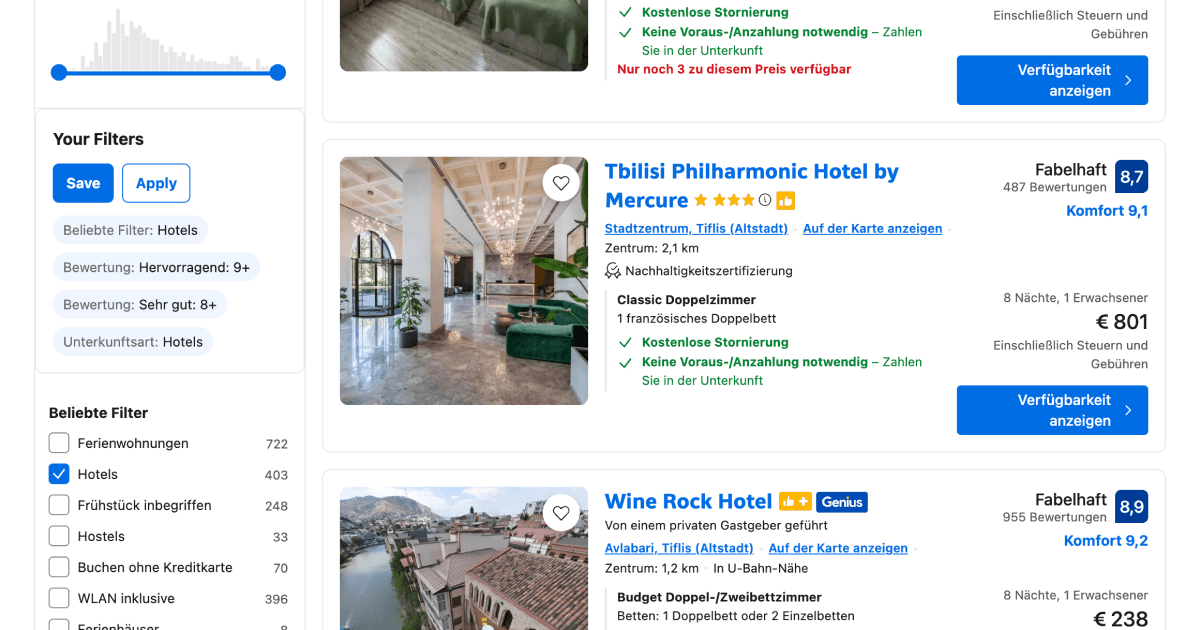
Every time you search for a hotel on Booking.com, you have to re-select the same filters from scratch. Free cancellation, breakfast included, guest rating 8+, the usual. This Drop in adds a "Your Filters" section above the popular filters in the sidebar that lets you save your current selection and reapply it on any future search with one click.
If your hotel preferences rarely change, there is no reason to set them up from scratch every time. Save once, apply everywhere, and get straight to browsing results that actually match what you want.
It reads all the currently active filters in the sidebar, stores them by name and group, and when you come back to a new search it finds the matching filters and clicks them for you one by one. Your saved filters stick around in your browser even if you come back weeks later.
Good to Know
- Filters are saved by their label text, so they work across different destinations and search dates
- If a saved filter does not exist on the current search (e.g. a destination-specific option), it gets skipped
- Your saved filters persist across browser sessions and Booking.com searches
- Doesn't require API credits
Best Use Cases
- Reapplying your go-to hotel preferences on every new trip search
- Keeping a consistent set of filters across different destinations
- Saving time when comparing hotels across multiple cities
- Quickly getting back to your preferred results after clearing filters
- Sharing a device where multiple people have different filter preferences