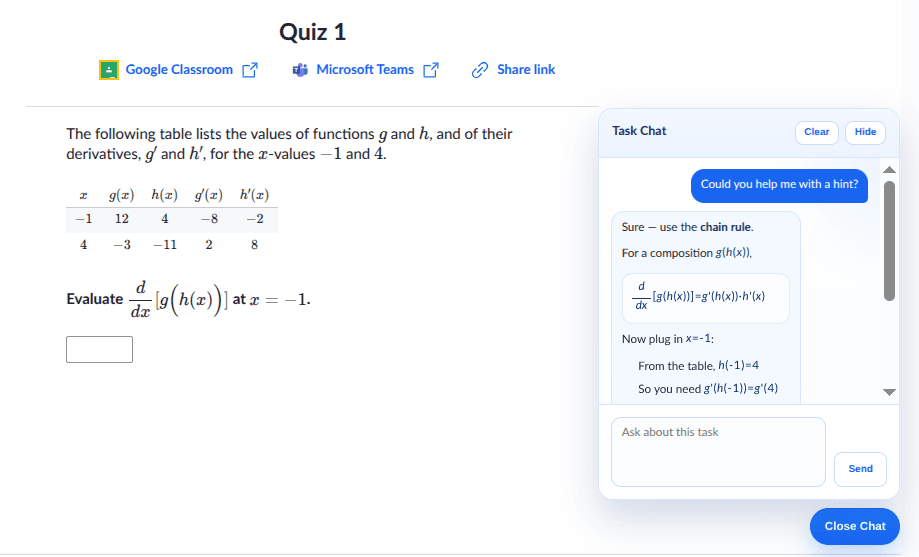
Khan Academy's AI tutor gives helpful explanations, but the chat replies show everything as plain text. Math equations appear as raw LaTeX strings, headings blend into paragraphs, and lists lose their structure. When you are working through a calculus problem or reading a step-by-step breakdown, that flat formatting makes the answer harder to follow than it needs to be.
This Drop adds automatic rich formatting to assistant replies in the Khan Academy Task Chat. Markdown elements like headings, bold text, and bullet lists render properly. LaTeX-style math expressions display as actual equations with proper notation. The formatting applies to both new messages as they arrive and messages already visible in the chat.
The panel layout and chat flow stay exactly the same. The formatting happens inside the existing chat bubble area, so nothing moves or breaks. It just looks cleaner and reads better, especially for math-heavy subjects.
Good to Know
- Renders markdown headings, lists, bold, and inline formatting in chat replies
- Displays LaTeX math expressions as properly formatted equations
- Works on both new and already visible messages
- Keeps the existing chat panel layout unchanged
- Does not require API credits
Best Use Cases
- Reading math explanations with proper equation formatting
- Following step-by-step solutions that use numbered lists and headings
- Studying subjects where notation matters, like physics or chemistry
- Making long tutor responses easier to scan and reference
- Getting more out of the AI tutor without switching to another tool