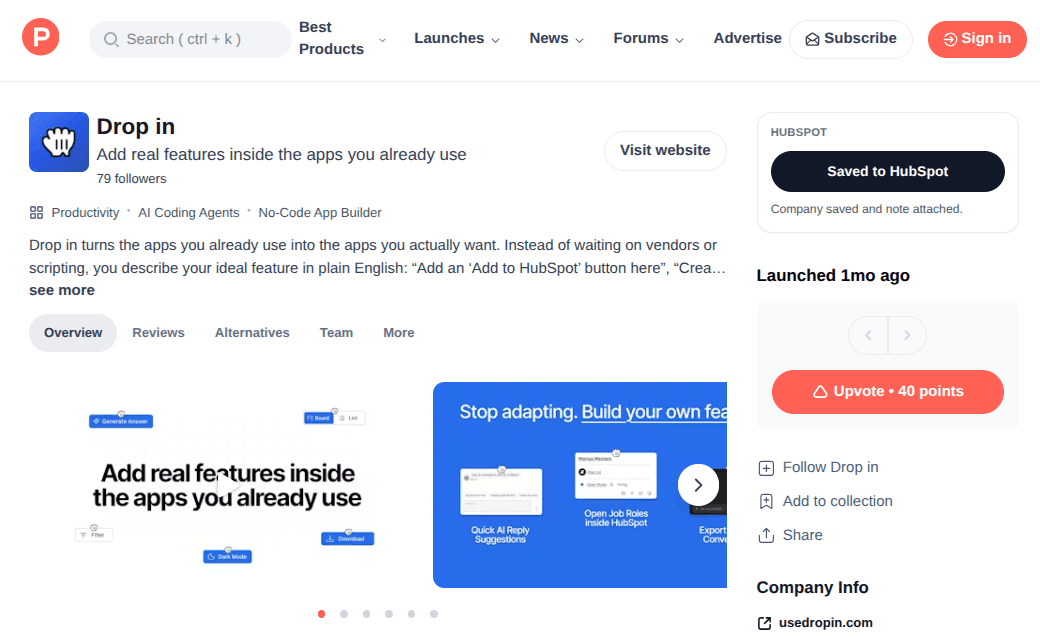
If you track Product Hunt launches as part of your workflow, whether for competitive intelligence, deal sourcing, or partnership scouting, you probably end up copying product names, URLs, and descriptions into a spreadsheet or CRM by hand. It is tedious and easy to skip when you are browsing quickly.
This Drop adds a "Save to HubSpot" button in the right sidebar of Product Hunt product pages. Click it and it captures the visible product details, generates a cautious AI summary of what the product appears to be, and creates or updates the matching company record and note in HubSpot. If the company already exists, it updates the existing record instead of creating a duplicate.
The result is a clean, structured record in HubSpot with the product name, description, launch details, and a summary note. No more copying and pasting between tabs or forgetting to log something you saw earlier in the week.
Good to Know
- Button appears in the right sidebar on Product Hunt product pages
- Creates or updates a HubSpot company record and attached note
- Generates an AI summary based on visible product details
- Avoids duplicate records by checking for existing companies
- Does not require API credits
Best Use Cases
- Tracking competitor launches from Product Hunt directly in your CRM
- Building a pipeline of potential partners or acquisition targets
- Logging interesting products for your team to review later
- Keeping a structured record of Product Hunt browsing sessions
- Replacing manual copy-paste workflows between Product Hunt and HubSpot