Funding rates on Binance Futures can quietly eat into your profits if you are not watching them. The information is available on the platform, but it is scattered and easy to miss when you are focused on entering or managing a trade. By the time you check, the funding event may have already hit.
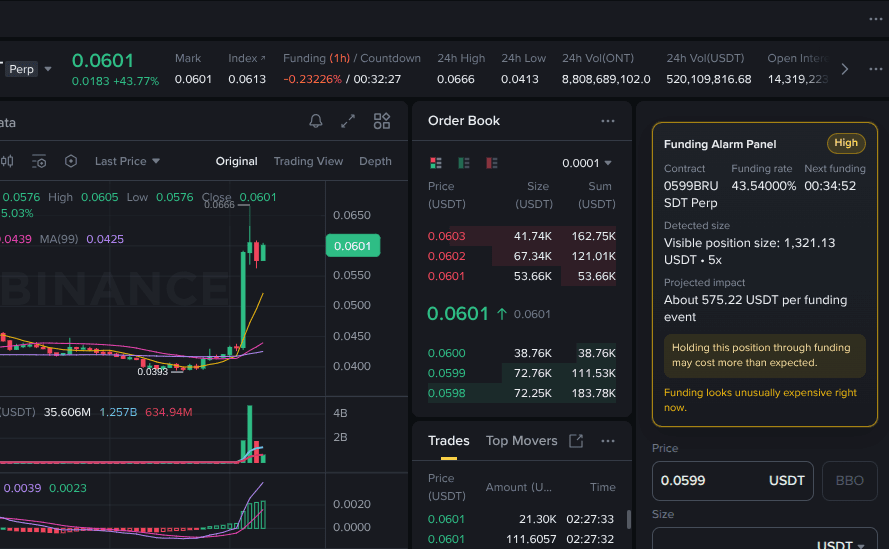
This Drop adds a compact Funding Alarm Panel directly inside the right-side order entry area on Binance Futures. It shows the current contract, the live funding rate, a countdown to the next funding event, your position size context, and the projected funding impact in dollar terms. A color-coded badge marks the funding drag as Low, Medium, or High so you can tell at a glance whether it is worth holding through the next interval.
The panel stays attached to the order entry area even as Binance rerenders the page, so it is always visible without covering your order inputs or trading controls. If the funding rate looks expensive, you get a simple warning before you commit.
Good to Know
- Panel appears inside the Binance Futures order entry area on the right side
- Shows contract name, funding rate, countdown, and projected dollar impact
- Color-coded badge: Low, Medium, or High funding drag
- Stays visible through Binance page rerenders without blocking order controls
- Does not require API credits
Best Use Cases
- Avoiding holding a position through an expensive funding interval
- Monitoring funding rate changes while actively trading
- Quickly assessing whether a funding rate is unusually high before opening a position
- Keeping funding cost awareness front and center during volatile markets