ChatGPT doesn't show you how long your conversation is. You keep chatting, the responses start getting worse, and you realize the model lost track of what you said 40 messages ago. By then it's too late.
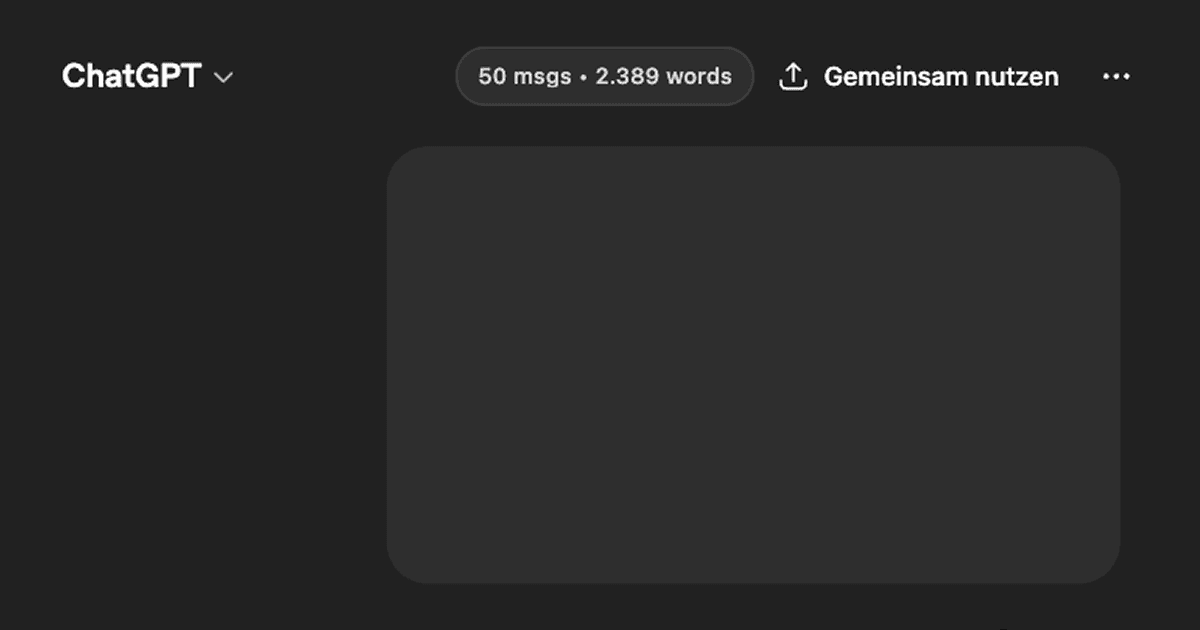
This Drop adds a small pill-shaped badge to the top of the chat area that shows the current message count and total word count across the entire conversation. It updates after every new message so you always know where you stand.
When conversations get long, models start forgetting earlier context. Seeing the numbers tick up helps you decide when to start a fresh chat instead of pushing a bloated one further. No AI needed, just simple counting.
Good to Know
- Works on chatgpt.com with the standard chat interface
- Counts both your messages and ChatGPT's responses
- Word count is estimated from visible text, not exact token count
- Updates automatically after each new message appears
- The badge matches ChatGPT's dark UI and stays out of the way
- No data leaves the page, everything is counted locally in the browser
Best Use Cases
- Knowing when a conversation is getting too long and context might be degrading
- Keeping track of how much you've written during long brainstorming sessions
- Comparing conversation lengths across different chats
- Deciding when to start a new conversation vs continuing an existing one
- Getting a rough sense of token usage without needing external tools