Wikipedia articles are long and dense. You find the key sentence, leave the page, come back a week later, and spend five minutes looking for it again. There is no built-in way to mark what matters.
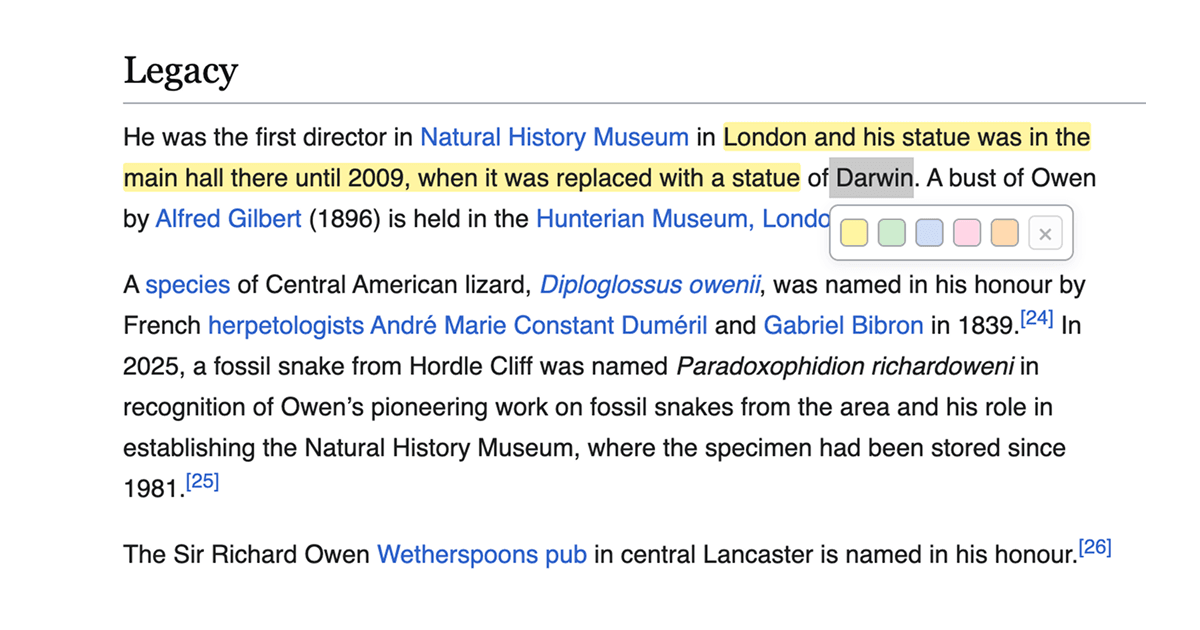
This Drop lets you highlight any text on a Wikipedia article just by selecting it. A small popup appears with five color options: yellow, green, blue, pink, and orange. Click a color and the text stays highlighted. Come back to the same article tomorrow and your highlights are still there.
Highlights are saved to your browser's local storage using the page URL, so they persist across reloads and revisits without any account or sync service. If you want to remove a highlight, just select the highlighted text again and click the remove button in the popup.
Good to Know
- Works on any Wikipedia article with the standard layout
- Five highlight colors: yellow, green, blue, pink, and orange
- Highlights are saved per article URL in localStorage
- Highlights survive page reloads and browser restarts
- Select already-highlighted text to see a remove option
- Prevents overlapping highlights on the same text
- The color picker popup matches Wikipedia's clean, minimal style
- No account needed, everything stays local in your browser
Best Use Cases
- Marking key facts and dates while researching a topic
- Highlighting definitions and important passages for study
- Color-coding different types of information across a long article
- Saving your place in articles you read over multiple sessions
- Building a visual summary of the most important parts of an article