Long videos are painful to navigate. You know the answer is somewhere in that 45-minute tutorial, but scrubbing through the timeline hoping to land on the right moment wastes more time than watching the whole thing.
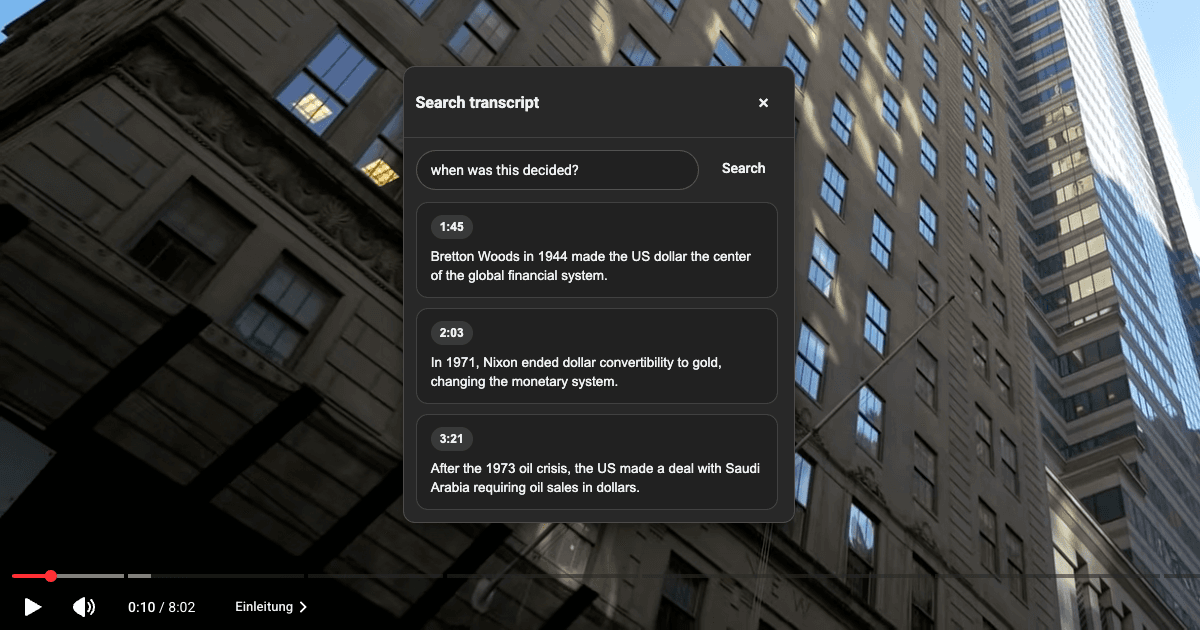
This Drop adds a native-looking Search button right next to the like and dislike buttons on any YouTube video. Click it, type a question, and Drop AI scans the full transcript to find every moment that answers it. Each result shows the timestamp and a short summary. Click any result to jump straight there.
When you open the search popup, the transcript loads automatically in the background. The script expands the description, opens the transcript panel, reads every timestamped segment, cleans out YouTube UI artifacts, and caches the result so follow-up searches are instant.
Good to Know
- Requires the Drop AI integration to be enabled for the AI-powered search
- Works on any YouTube video that has a transcript or captions available
- The transcript is cached per video, so the first search takes a moment but follow-up queries are fast
- The search button matches YouTube's native button style and sits next to the existing action buttons
- German and English YouTube interfaces are both supported for opening the transcript
- The popup is draggable so you can move it out of the way while watching
- Video automatically plays from the selected timestamp when you click a result
Best Use Cases
- Finding specific answers in long tutorials or lectures without scrubbing
- Jumping to the exact moment a topic is discussed in a podcast or interview
- Locating quotes or claims in news videos for fact-checking
- Navigating conference talks or webinars to the sections you care about
- Searching coding tutorials for the part where a specific function or concept is explained
- Quickly checking if a video covers a topic before committing to watching it